FINANCIAL REPORTING

Financial statements in Word with data from Excel

You prepare financial statements in Word with data from Excel in FlexiStatements, the Excel and Word add-in in the FlexiEPM financial statements software. You load tables, amounts and dates from the worksheet into the document, so you don’t retype figures after every correction.

FlexiStatements is not a separate application. You install it on the user’s computer with no additional configuration, and a new tab appears in Excel and Word. It works with any Excel file, including files from outside FlexiEPM, so you link data with a Word document without changing the way you work.

Step 1: Preparing the financial statement package in Excel

The first step is to organise the data in Excel in a layout that matches the final look of the document: the same headers, fonts and colours as in the financial statement.

This is not a new file or a new calculation method. It is the same worksheet the finance team already prepares, only brought into a form ready to be linked with Word.

It works best when the Excel template has control checks, from assets equalling liabilities to more complex consistency checks across the statement. This is how AIDER Polska works: each type of financial statement has such a template, and in the next period the team only adds tags for new lines and notes. Once this step is complete, the data file is ready to be linked with Word.

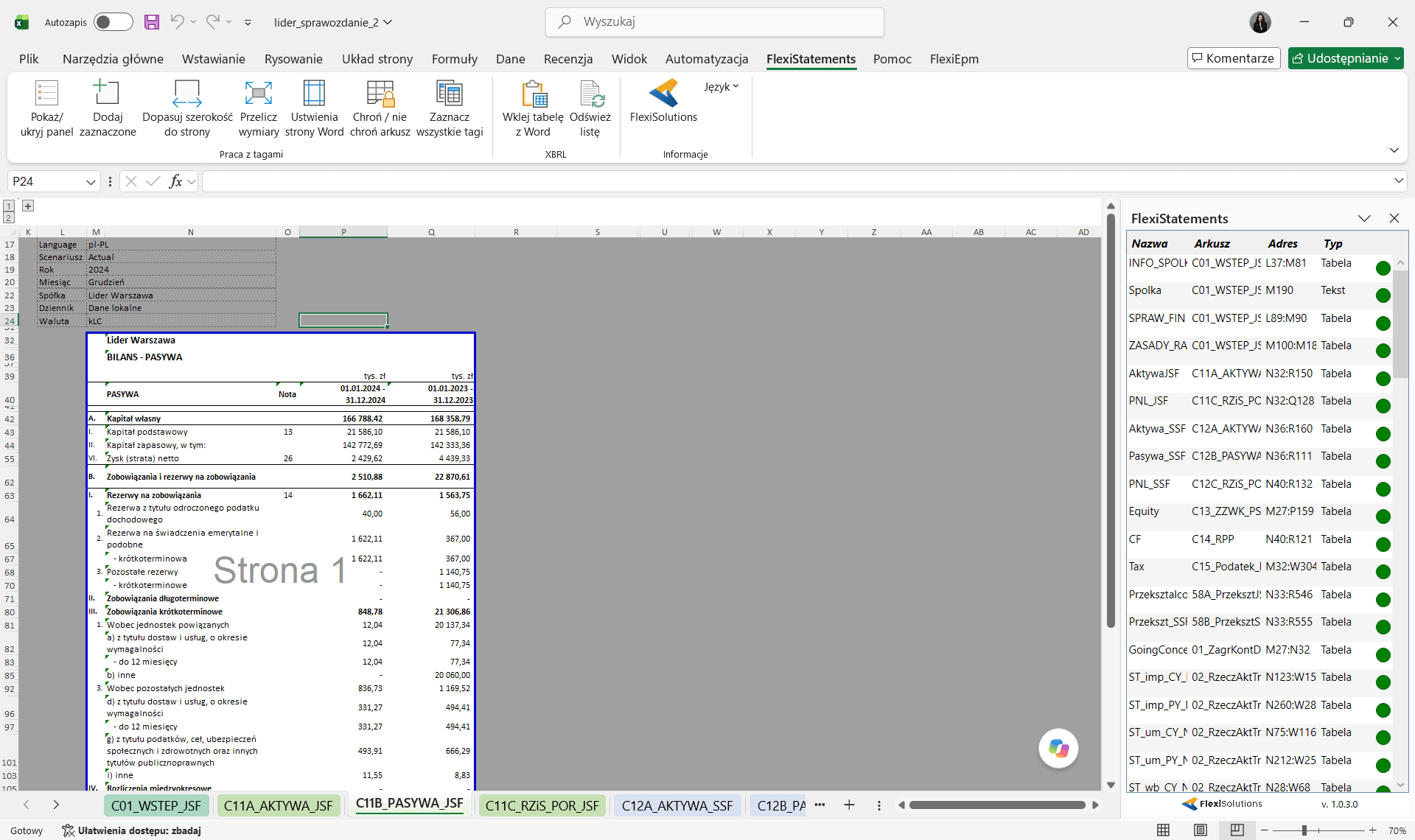
Balance sheet, liabilities in an Excel worksheet with the tag range marked and the FlexiStatements panel.
Financial statement package in Excel. Each table is a tag with its own name and cell range. A green dot in the panel means the table fits within the Word page margins.
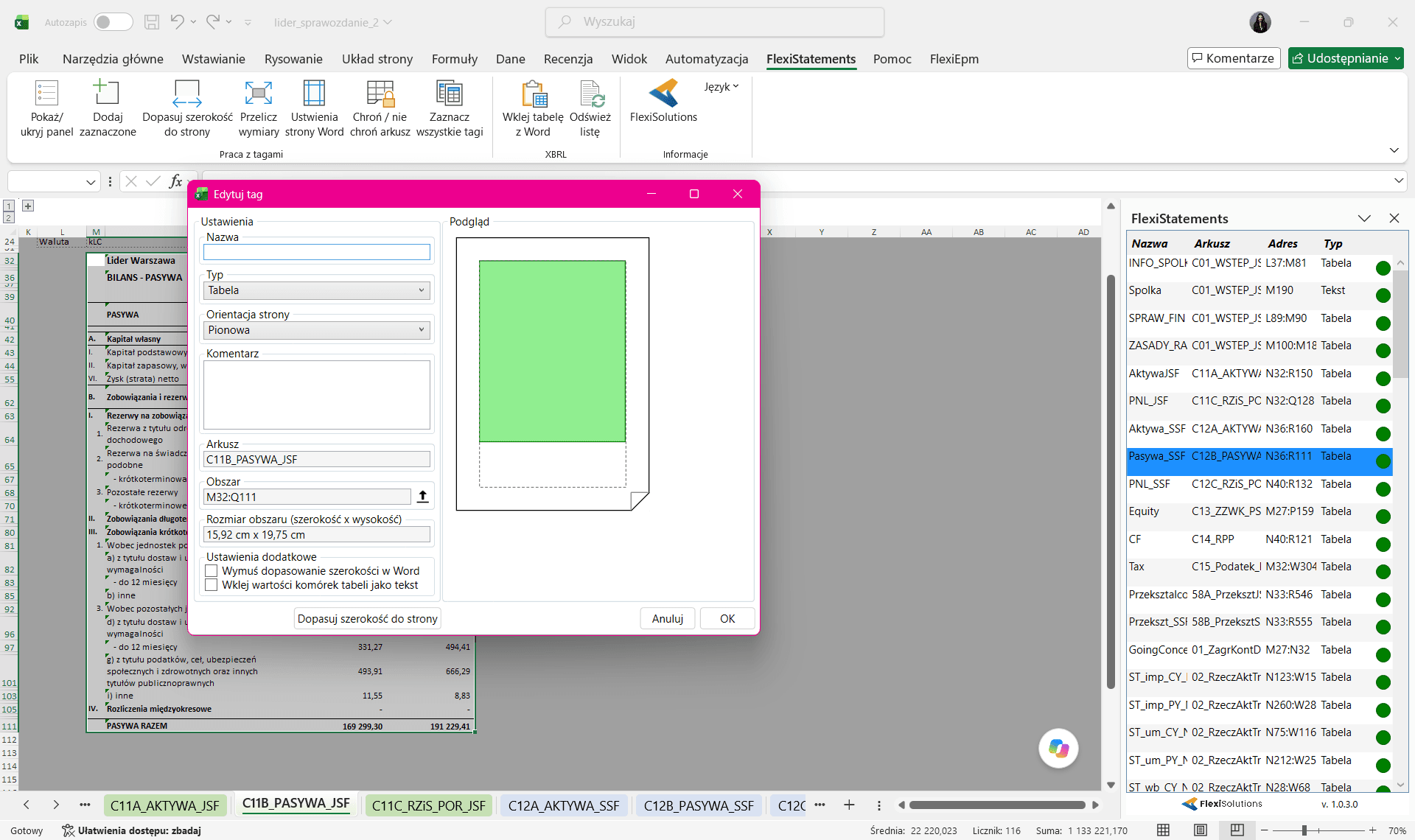
Edit tag window in the FlexiStatements add-in for Excel, with the name, type, table range and a Word page preview.
Editing a tag in FlexiStatements. You choose the table range and page orientation, and the preview shows how the table will fit on a Word page. You can fit the width with one click.

Step 2: Defining report objects for use in the financial statement

The next stage involves creating report objects that enable full automation of the statement. In Excel, select the relevant tables or cells and assign them unique names. These names act as references in Word, forming a “map” for automatic data updates. An object, or tag, can be a table, a single value or text, for example a date or an amount in a note description.

After selecting the range, you check how the table will fit on the page. A green marker next to the tag means it fits between the Word margins, and a red one means the width needs adjusting, which takes one click. The preview takes into account the page orientation and any custom page dimensions set in Word.

Step 3: Linking Excel with the Word document

After preparing the reporting package, connect the Excel file with your Word template. In the Word document, simply indicate the source Excel file from which the data will be retrieved automatically.

Just point to the file’s location on your local drive or network path. One Word document links to one Excel file, but that file can pull data from other files, including files on network drives, for example through Power Query.

Each financial statement then gains a dynamic structure that allows easy updates whenever data changes.

Selecting the Excel file from which the Word document takes data in FlexiStatements
Choosing the Excel file from which the Word document loads data in FlexiStatements
FlexiStatements panel in Word with a list of tags to insert into the financial statements template
The FlexiStatements panel in Word with a list of tags to insert into the financial statement template

Step 4: Inserting references into the statement template

At this stage, static tables in the Word template are replaced with links to the report objects defined in Excel. Place the cursor in the desired position and double-click the corresponding reference from the list, and the system inserts the linked data.

Amounts and dates that appear several times in the document are inserted as tag copies or cross-references. You can search tags by name, go from any tag to its source in Excel and leave a comment on a tag for the next person. You can reuse the same document in later reporting periods.

Step 5: Updating the financial statement

Once the template is complete, one command reloads all tags, and the objects in the Word document take the latest data from Excel.

This functionality allows you to quickly prepare reports for multiple entities or maintain a consistent archive of statements from previous periods. Switching between Excel files is just as simple, further enhancing flexibility and efficiency.

A new row in an Excel table appears in Word when you reload the tag, because the tag range extends automatically. When the auditor proposes a correction to the result, reloading the tags updates the amount in the tables and in the note text, so you don’t have to look for it in every paragraph.

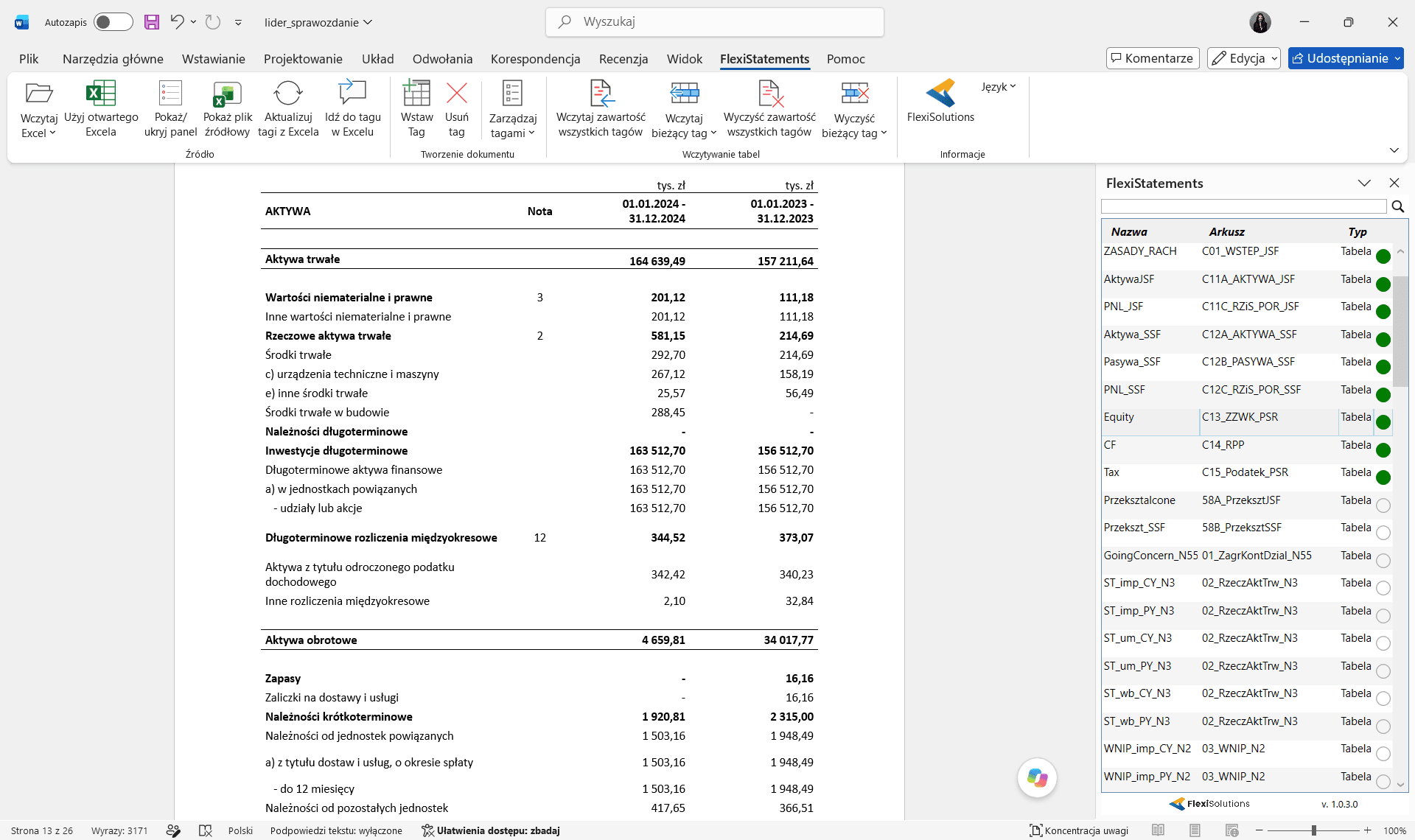
Financial statement in Word with the balance sheet loaded from Excel and the FlexiStatements panel listing tags.
Updating a financial statement in Word. You load tables from Excel with one click, keeping the worksheet formatting. The panel lists all tags and shows which ones are already in the document.
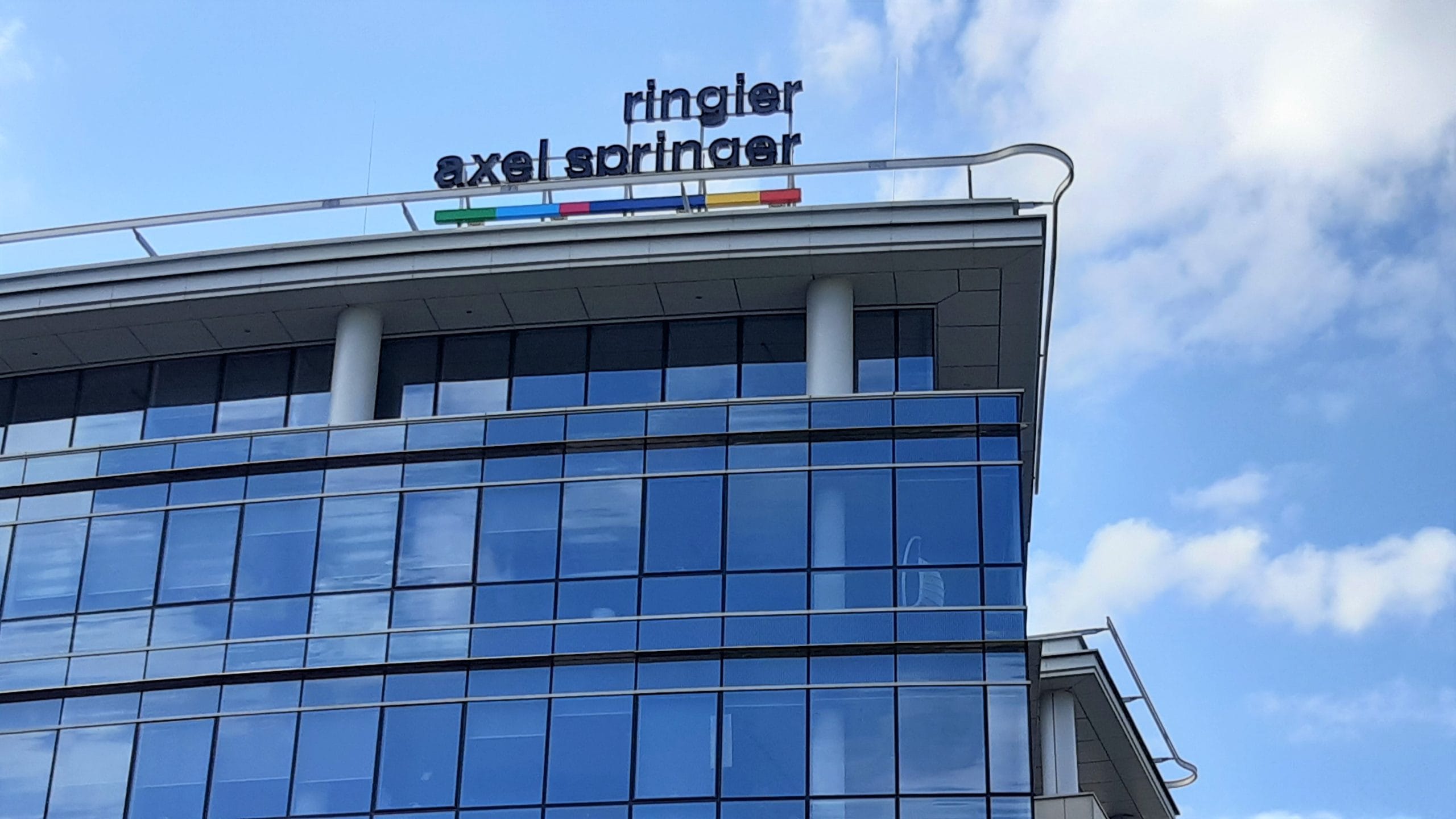
Financial statements under IFRS and local GAAP at Ringier Axel Springer Polska
Financial statements under IFRS and the Polish Accounting Act at Ringier Axel Springer Polska

How does it work in practice?

At Ringier Axel Springer Polska, the team moved some of the narrative notes from Excel to Word and handles them with the FlexiStatements add-in. Before, the team printed each page of the financial statement to PDF, arranged the pages in the right order, merged them into one file and aligned the formatting. Every correction meant repeating the whole operation.

Today, the financial statement is produced in the system, and after a correction nobody has to put the document together again. We describe how the team prepares financial statements under IFRS and the Polish Accounting Act for eight companies in a case study.

AIDER Polska works this way on a large scale: a team of about 20 people prepares 400–500 financial statements a year under IFRS and the Polish Accounting Act. Before, AIDER tried standard Office links between Word and Excel, but at this scale documents froze and links got lost.

#KNOWLEDGE BASE

Find out more on our blog

Alternative to Oracle Hyperion and SAP BPC
Controlling

FlexiEPM as an alternative to Oracle Hyperion and SAP BPC – a comprehensive EPM system for controlling and consolidation

Many companies running Oracle Hyperion or SAP BPC are wondering what comes next: migration to Oracle Fusion Cloud EPM or another platform? FlexiEPM is a modern EPM system that combines budgeting, reporting and consolidation in one environment, fully integrated with Microsoft Excel and with support close to the user. See what your future after Hyperion could look like.


Read more >
IFRS 16 lease accounting
IFRS 16

IFRS 16 lease accounting

When does IFRS 16 apply? How should a lessee present leases in its financial statements to comply with IFRS 16? How do you measure the right-of-use asset and the lease liability?

Read more >
skonsolidowany bilans / system controllingu HR
Consolidation

How to prepare a consolidated balance sheet?

How do you prepare a consolidated balance sheet for a group of companies? This practical guide walks you through the process step by step: preparing separate balance sheets, local adjustments, capital adjustments and goodwill, and eliminations of intercompany balances.

Read more >

What do customers say about us?

Hanna Stachowicz
Hanna Stachowicz
Senior Financial Reporting Specialist at Ringier Axel Springer Polska
Previously, we had a separate Excel sheet for each note and each element of the report. Once the data had been entered, we had to export each page to PDF, arrange the pages in the correct order, merge them into a single file and then adjust them so that the formatting was consistent throughout. If anything changed, we had to start all over again.

Nowadays, some of the notes are generated automatically and we don’t have to re-enter the data. It’s a much more organised process. It’s also easier to trace the source of the data for an audit. And if someone asks me for a report for a specific period, I load the turnover figures, do the calculations and I have a preliminary report.
Iwona Borowska
Iwona Borowska
Deputy Chief Accountant at Notus Finanse S.A.
From the perspective of the monthly reporting process and the necessary support for reporting processes, Notus Finanse S.A. highly values the use of the tool for calculating IFRS 16 lease agreements.

The tool allows for ongoing verification of the consistency of entered parameters, resulting in data sets necessary for reconciling financial and accounting balances.

FlexiEPM provides the ability to analyze data from the input level, enter supplementary information and parameters in various configurations, resulting in a fully automated, consistent repository of lease agreements and a set of reports enabling clear analysis of data and transactions necessary for the work of the finance department.

Michał Gumiński
Michał Gumiński
Financial Director at Torf Corporation
Working with FlexiSolutions allowed me to create a flexible ecosystem that addresses difficult operational issues such as sales planning and consistently reflects them in the controlling area.

It's particularly worth emphasizing the flexibility of the FlexiSolutions team's solutions and highly problem-solving approach – thanks to this, we were able to find non-standard solutions that out-of-the-box systems couldn't handle.
Marcin Radziszewski
Marcin Radziszewski
Financial Director at PBKM S.A.
The system has handled the Group's scale and complexity very well – as a result of the implementation, we have a consistent repository of financial data for all consolidated companies, regardless of differences in the systems and structures of accounting records maintained at the individual level.

From the perspective of the monthly reporting process, we particularly value the use of control reports, which allow for quick verification of the consistency of local data provided by companies, as well as reports that simplify the reconciliation of balances and settlements.

Additionally, the tool's capabilities were utilized to gather and consolidate budgets for all companies. Seeing real benefits, we are systematically expanding the scope of the system's use within our company, not just in the finance department.
Piotr Kamiński
Piotr Kamiński
Vice President of the Management Board at Wielton S.A.
The implemented tools broadly support controlling and management reporting processes at the level of the parent company, Wielton S.A., and its subsidiaries. The system is constantly developed and adapted to the growing needs of the enterprise (...).

Currently, FlexiEPM is used by all 16 companies in the group, and the solution is used by over 100 users.
One of the implemented modules is the intragroup transaction reconciliation module. The provided tool enables transaction reconciliation within management and stock exchange reporting processes.
Grażyna Maciejuk
Grażyna Maciejuk
Chief Financial Officer at Instac
FlexiEPM is a highly flexible tool whose reporting structure can be fully customized to the company's specific needs. I recommend this solution because it meets the needs of users at various levels – operational, financial, and management.

The implementation team thoroughly understands the client's analytical and reporting needs, proposing various possible solutions based on their extensive experience. Their knowledge of data analysis and reporting, not just the technical aspects of application implementation, greatly simplifies the implementation process.
Jolanta Anton
Jolanta Anton
Chief Accountant at MediaMarktSaturn Polska
The solutions provided by FlexiSolutions enable automatic processing of input data in the form of appropriate SAP R/3 reports and transactions, and enable users to enter additional information and parameters directly using specially designed forms.

The implemented configuration provides full support for reporting processes, including the ability to automatically prepare final reports in XML structures compliant with regulatory requirements.
Justyna Szumowska
Justyna Szumowska
Chief Accountant at Transition Technologies
The system was used to prepare individual reports for group companies and consolidated reports. Currently, the system is used by 18 group entities (including foreign subsidiaries). The set of reports allows for clear analysis of transactions between companies.

Control reports allow for data analysis from aggregate values to the lowest level of input data. The solution was tailored to the specific needs of our organization. Financial and accounting data processing mechanisms ensure appropriate process automation. The result is a consistent repository of financial data for all companies, regardless of differences in systems and structures.
Michał Kacprzak
Michał Kacprzak
Member of the Board at Baltona
FlexiEPM supports the following reporting areas: consolidation in the statutory system for monthly reporting packages for the owner, preparation of individual and consolidated reports for stock exchange reporting, preparation of annual reports in accordance with the Accounting Act, and consolidation and management reporting.

The system demonstrates the flexibility necessary to support various capital structures, and the implementation team has the appropriate competencies and experience to effectively carry out implementation and development work.
Małgorzata Sulkowska
Director of the Controlling Office TU INTER Polska S.A.
For me, as the person responsible for controlling, the biggest change and benefit is that we can focus on analysis rather than technical process support. Data consolidation and changes now take a fraction of the time we used to spend on Excel.
Beata Wąsowska
Beata Wąsowska
Compensation & Benefits Manager at Grupa Żywiec
Together with the FlexiEPM team, we transformed what had been a highly complex budgeting process. A model previously dependent on complicated and error-prone Excel workbooks became a transparent solution that gives us confidence in the data and ensures full continuity within the team. We particularly value the flexibility of the platform and the responsiveness of the implementation team. For the first time, HR and Finance at Grupa Żywiec can work from the same figures and speak the same language when discussing personnel costs.
Joanna Pilipczuk
Joanna Pilipczuk
Group Financial Reporting Director at Wirtualna Polska Holding
At this scale, Excel was no longer a sufficiently secure solution. Today, we have confidence in our data, full control over account mappings, and the ability to work with multiple currencies without maintaining parallel calculations outside the system.
Iwona Czech
Iwona Czech
Head of Controlling in the Automotive segment of Boryszew Group
We shifted the workload from copying data to analyzing it. Previously, head office collected Excel files from all the companies, copied the data and prepared the consolidation manually.
Today, the companies report in FlexiEPM, and even before they submit a report, they can see in the validation report what needs to be corrected.
They reconcile intercompany balances among themselves. We receive ready-to-use data, start the consolidation process and only have to explain any differences. With this many companies, going back to manual reporting and consolidation in Excel is out of the question.

Book a Consultation with an expert

Streamline your planning, controlling, reporting, and consolidation processes in a single system.
Eliminate errors and reduce time-consuming tasks through integration and automation.

Mariusz Sumiński

Mariusz Sumiński

Managing Director, Co-Founder